Your Content Folder Is the Application: Recursive Navigation with WBPress
This is the canonical, maintained edition. Community platforms receive adapted versions that link back here.
Release availability — November 2026: this tutorial targets the release after
WBPress 3.0.0-rc.2, which adds recursive directory navigation. Until it reaches npm, continue
writing explicit navigation nodes with rc.2.
Most content frameworks eventually make authors maintain the same hierarchy twice: once in the
filesystem and again in route or sidebar configuration.
That duplication looks harmless until a page moves, a section is renamed, or navigation order
changes. Then the files, routes, sidebar, search index, and sitemap begin to disagree.
WBPress removes that duplication without giving up explicit control.
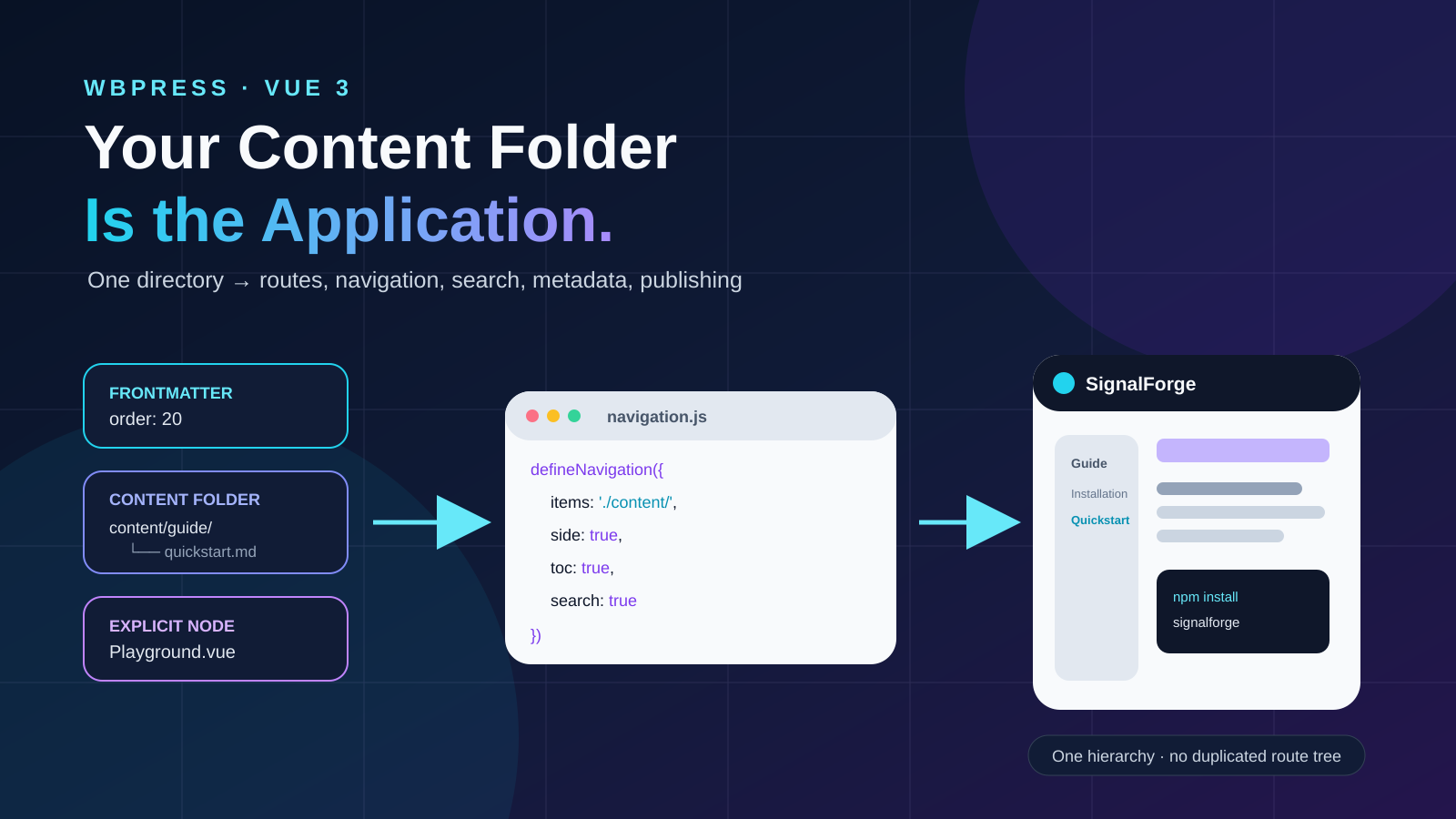
Declare a real content directory with items: './content/'. WBPress recursively expands it into its
canonical content graph. That graph then drives routes, nested navigation, search, metadata,
previous/next links, and publishing artifacts. When convention is not enough, mix explicit Vue,
WBC, media, or custom-route nodes into the same graph.
real content folder + frontmatter + explicit exceptions
                           ↓
              items: './content/'
                           ↓
                        WBPress
                           ↓
 routes + navbar + sidebar + content + search + metadata + sitemap
The folder is the authoring source. The normalized graph is the application contract. Both remain
visible, portable, and testable.
This tutorial builds a small documentation application from scratch to show how simple that process
can be.
What we are building
Imagine an open-source product called SignalForge: a lightweight webhook development toolkit.
Its documentation needs to answer four questions:
- What problem does SignalForge solve?
- How do I install it?
- How do I send my first event?
- Where can I inspect the API and examples?
The folder hierarchy expresses the intended information architecture:
/
├── guide/
│   ├── installation/
│   └── quickstart/
├── reference/
│   └── configuration/
├── examples/
└── playground/
The site should have a responsive sidebar, dark mode, full-content search, previous/next links,
metadata, and a sitemap. The playground should be a Vue component; the rest can remain Markdown.
Step 1 — make the content folder the source of truth
Start with the part that matters most: the information.
src/content/
├── index.md
├── guide/
│   ├── index.md
│   ├── installation.md
│   └── quickstart.md
├── reference/
│   ├── index.md
│   └── configuration.md
└── examples.md
For example, src/content/index.md might begin with:
# SignalForge

Develop, replay, and inspect webhooks without rebuilding the same local tooling for every project.

## From event to evidence

SignalForge receives an event, records its delivery attempt, and lets you replay it against a local
or remote endpoint.

[Install SignalForge](/guide/installation) or [send your first event](/guide/quickstart).
And src/content/guide/quickstart.md can be ordinary technical Markdown:
# Quickstart

Start the local receiver:
npx signalforge listen --port 4100
Send a test event:
curl -X POST http://localhost:4100/events \
-H 'content-type: application/json' \
-d '{"type":"invoice.paid","id":"evt_001"}'
These files remain portable Markdown, and their actual locations—not a second hand-written route
list—define the ordinary site hierarchy.
Step 2 — make the folder executable
A real filesystem folder can become the ordinary part of the content graph directly. Declare it
once with the explicit trailing-slash directory marker: items: './content/'.
The interactive playground remains an explicit Vue page. This hybrid is intentional: discovery
handles conventional content while one node handles the application-specific exception.
WBPress applies straightforward conventions:
index.mdbecomes its directory route;- nested directories become nested
children; - filenames become route segments;
- numeric prefixes and frontmatter
ordercontrol sibling order; - labels and metadata come from frontmatter;
- frontmatter can override labels, descriptions, order, icons, and sidebar visibility;
- the explicit playground node is merged with the discovered graph.
The tree printed above is documentation for the reader, not duplicated configuration. When files
move inside src/content/, the discovered routes and sidebar follow the folder on the next build.
Step 3 — declare the directory once
The central declaration in src/config/navigation.js is intentionally small:
import { defineNavigation } from '@wbc-ui/press';

export default defineNavigation({
  items: [
    './content/',
    { name: 'Playground', path: '/playground', item: './pages/Playground.vue', label: 'Playground' },
  ],
  nav: ['sbarTrigger', 'logo', 'brand', 'VSpacer', 'search', 'dark'],
  side: true,
  search: true,
  prevNext: true,
  toc: true,
  headingAnchors: true,
  darkMode: { default: 'auto' },
});
The trailing slash is the opt-in. ./content/guide.md remains a normal WBC file item;
./content/ requests recursive discovery. A ../content/ reference works too when the supplied
context uses the same relative base.
Step 4 — provide a build-safe content inventory
WBPress does not ask the browser to read a filesystem. Vite supplies a static inventory through
createGlobContext, and WBPress expands only the declared directory:
import { createGlobContext, createWbPress } from '@wbc-ui/press';
import navigation from './config/navigation.js';

const context = createGlobContext({
  raw: import.meta.glob('./content/**/*.{md,mdx,html,json}', {
    eager: true,
    query: '?raw',
    import: 'default',
  }),
  lazy: import.meta.glob('./content/**/*.{vue,js,ts}'),
});

createWbPress(navigation, { context, vuetify }).mount('#app');
Before Vue Router, the sidebar, or search sees anything, WBPress converts the directory into ordinary
navigation nodes. The resulting graph is inspectable and can be validated like a hand-written one.
Step 5 — understand what WBPress derives from the graph
From the same nodes, WBPress can produce:
- Vue Router routes;
- the navbar and nested sidebar;
- selected and expanded navigation state;
- previous/next links in graph order;
- page titles and metadata;
- searchable records joined to Markdown body content;
- sitemap and route-manifest entries;
- feed entries when enabled;
- localized page selection when each item is a language map.
The application does not need six disconnected configuration files that can drift away from each
other. The graph is the shared source.
Step 6 — run and verify the result
Run the same checks used for an explicitly authored graph:
npm run dev
npm run build
npm run preview
Then verify behavior, not only compilation:
- Every path opens directly and through the sidebar.
- Searching for a phrase inside a paragraph finds the correct page.
- Mobile navigation opens, closes, and restores focus correctly.
- Light and dark themes remain readable.
- Previous/next links follow the intended tree order.
- The playground is a real Vue page inside the same content graph.
- Metadata, sitemap, robots file, and search index contain the public URLs.
- A missing Markdown leaf or duplicate route name fails visibly.
What did we actually get?
We started with:
- one real folder containing seven small Markdown files;
- one explicit Vue playground;
- one directory declaration.
We finished with:
- a normal Vue 3 + Vite project;
- a convention-generated but reviewable route graph;
- responsive navigation and nested sidebar;
- Markdown and Vue pages in one application;
- full-content search;
- light and dark themes;
- page metadata and canonical URLs;
- sitemap, route manifest, search index, and optional feed;
- production build evidence;
- source code that remains understandable without a proprietary project database.
That last property matters most: moving or adding ordinary content does not require maintaining a
parallel route tree.
Where an explicit graph still belongs
An explicit graph remains useful when public URLs deliberately differ from content folders, when a
migration must preserve legacy paths, or when most pages are dynamic WBC/Vue nodes. In those cases,
write complete defineNavigation(...) nodes.
Do not maintain both a copied route tree and a matching content folder for an ordinary docs site.
Two sources that express the same hierarchy can drift. Prefer the folder as the source; add explicit
nodes only for genuine exceptions.
Why directory discovery does not become an invisible router
WBPress does not ask the browser to scan a disk. A statically declared Vite context inventories the
content, and the explicit trailing-slash marker enables discovery. WBPress expands that inventory
into its normal graph before routing.
A WBPress node can render:
- Markdown;
- a Vue component;
- an image or video;
- an external URL or embed;
- a localized item map;
- an array or object rendered through WBC;
- a context-aware dynamic descriptor.
The graph also carries labels, ordering, icons, metadata, visibility rules, and children. A folder
name cannot express all of those decisions.
So the workflow combines the best part of file routing—low ceremony—with the best part of WBPress:
an explicit programmable graph for every exception.
The capability in one sentence
**Your folder supplies the convention; WBPress supplies the application graph; explicit nodes
preserve control wherever convention stops.**
This is more than filesystem routing. The same normalized graph coordinates rendering, navigation,
search, metadata, and publishing without forcing every page into the same content type.
Resources
- WBPress documentation: https://press.wbc-ui.com
- Build-with-AI tutorial: https://wi-bg.com/articles/build-with-ai-keep-the-code
- npm package: https://www.npmjs.com/package/@wbc-ui/press
- WBC-UI ecosystem: https://wbc-ui.com
- Source: https://github.com/wbc-ui/press
</div>